How do you colorize an old black-and-white photo?
Upload a scan to OldPics, turn on Colorize, and you get back a color version of the photo with damage repaired at the same time. The colors are a best guess: a black-and-white photo records light and dark, not hue, so the result shows plausible colors, not the real ones. Colorize works on free restores too, and you get 5 free with no card needed.
An example
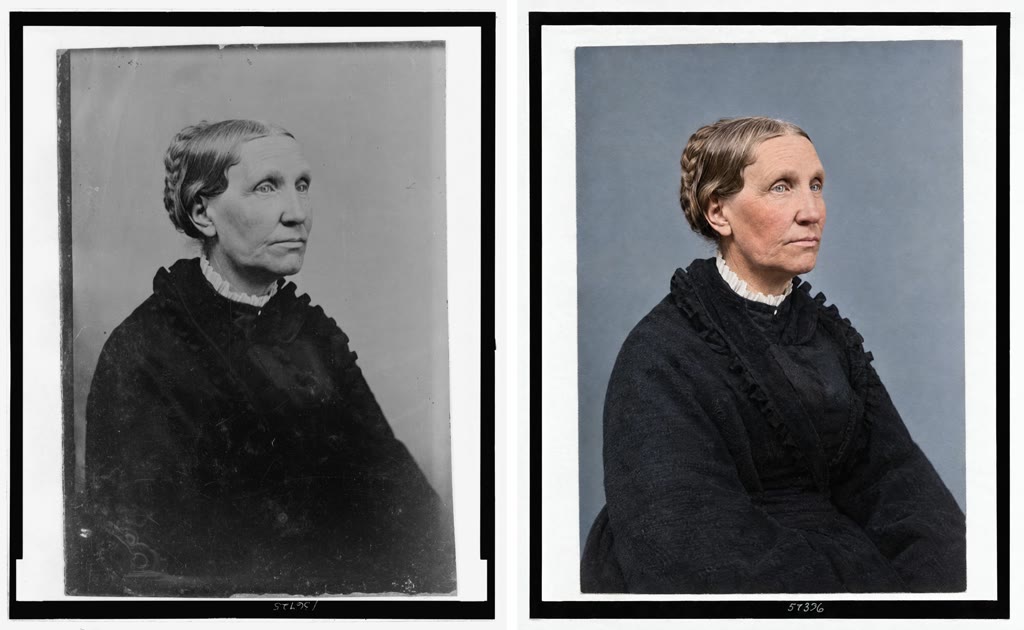
The skin tone, the blue-grey backdrop and the black dress in this version are choices, not facts. Another run could make the backdrop brown or the dress dark green. Nothing in the original says which is right.
How it works
A black-and-white print stores one value per spot: how bright it is. A red dress and a green dress of the same brightness look identical in gray. When you colorize, the restore looks at what is in the picture (a face, a sky, a wool coat, a wooden chair) and paints in colors that such things usually have. That is why skin, sky and foliage tend to come out believable, while clothing, painted walls and objects that could be any color are a coin toss.
Steps
- Scan the photo as sharply as you can, in color mode even if the print is black and white. Color mode keeps the warm or cool tone of the paper.
- Upload it at oldpics.ai and turn on Colorize.
- Choose your options. Turn on Compare if you want several color guesses in one go (2 on free, 1 restore; 6 with a pack, 4 restores). Quality is set for you: Standard on free restores, High with a pack.
- Pick the version that matches what you know and download it.
Use Compare to see several guesses
Because the colors are guesses, one version can mislead you. Two or six versions side by side show you which colors the versions agree on and which they don't. If every version gives the same brown hair, that is a reasonable reading of the gray tones. If one gives a blue dress and another gives a red one, the photo doesn't tell you, and you should go by what you know.
Restore and colorize in one step, or restore first?
You can do both at once: damage repair and color come back together in one version. Doing it in two steps, restoring in black and white first and then colorizing that result, costs two restores and does not recover any more color information. The one-step route is the normal choice. Keep the black-and-white restore as well if you want a version with no guessed colors at all.
What it gets wrong
- Clothing and fabric. The most common miss. A dress, a tie or a quilt can come out in any color that fits the gray value.
- Uniforms and insignia. Military uniforms, school colors, badges and ribbons have specific colors that the photo alone can't show. Expect errors.
- Known colors. Eye color, hair color, the family car, a painted house: if someone remembers the real color, trust them over the result.
- Hand-tinted prints. Some old portraits already have painted cheeks or lips. Colorize may keep or change that tint.
- Faded color photos. A color print that has shifted to red or cyan still has some color in it. Restoring without Colorize is often the better choice there.
Check the result with someone who knew the people or the place before you print it or share it as how it looked.
FAQ
Is colorizing free?
Yes. Colorize is available on free restores. You get 5 free restores with no subscription and no card. After that, packs are $9 for 20 restores or $29 for 100, paid once.
Why did two versions of the same photo come out in different colors?
Because the original has no color to recover. Each version makes its own reasonable guess. That is expected, and it is the reason Compare exists.
Should I scan a black-and-white photo in color or grayscale?
In color. It keeps the paper tone and any hand-tinting, which gives the colorize step a little more to work from and gives you a truer copy of the original.
Does colorizing change the faces?
It aims to keep the same faces, expressions and ages, and only add color. Where the original face is blurry or damaged, detail may be softened or filled in, so compare it with the original.
Colorize a black-and-white photo at oldpics.ai. 5 free restores, no card needed.
Related guides
Last updated: 25 September 2026