Can you restore a water-damaged photo?
Often, yes. Stains, tide lines, foxing, fading and small cracks usually clean up well from a good scan. What can't come back is image that is physically gone: if water lifted the emulsion off a face, the restore can only fill that area with a guess.
Stains and foxing: what cleans up
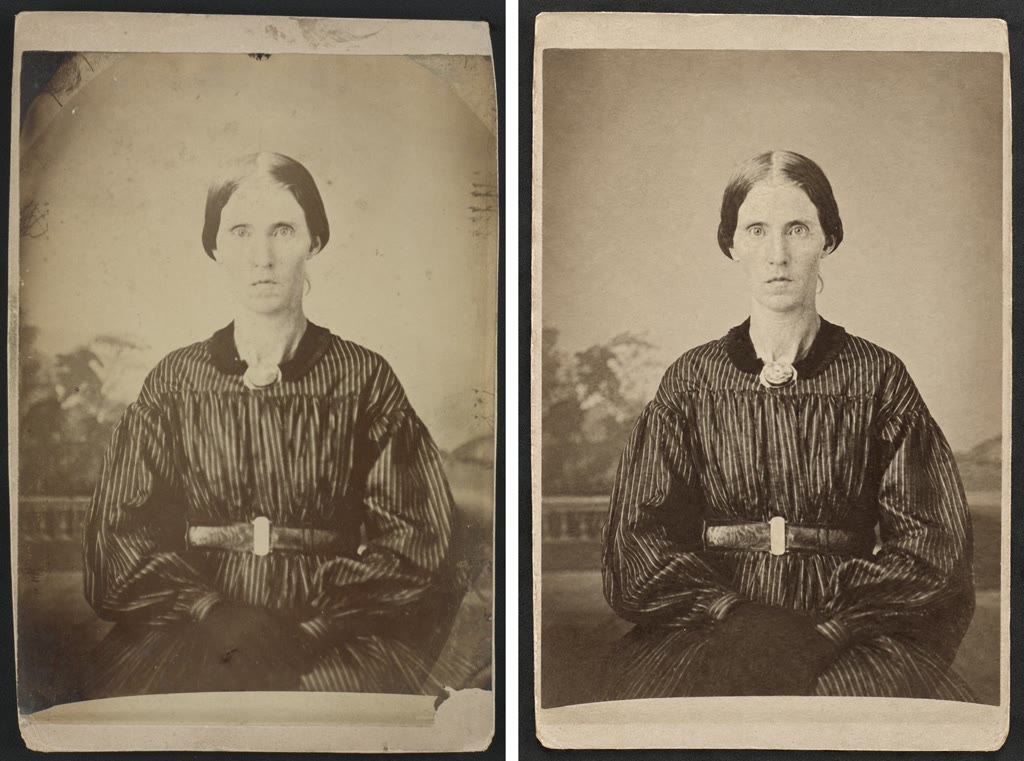
This print has staining, foxing spots and worn edges, the kind of surface marks that water and damp storage leave. The restore removed most of them and kept the face, the striped dress and the paper tone.
Damage that usually cleans up well:
- Stains and tide lines, the brown rings left where water dried.
- Foxing, small brown or orange spots from damp storage.
- Fading and uneven tone, including yellowing.
- Small cracks, creases and specks, where the image around them is intact.
Where it stops: missing image
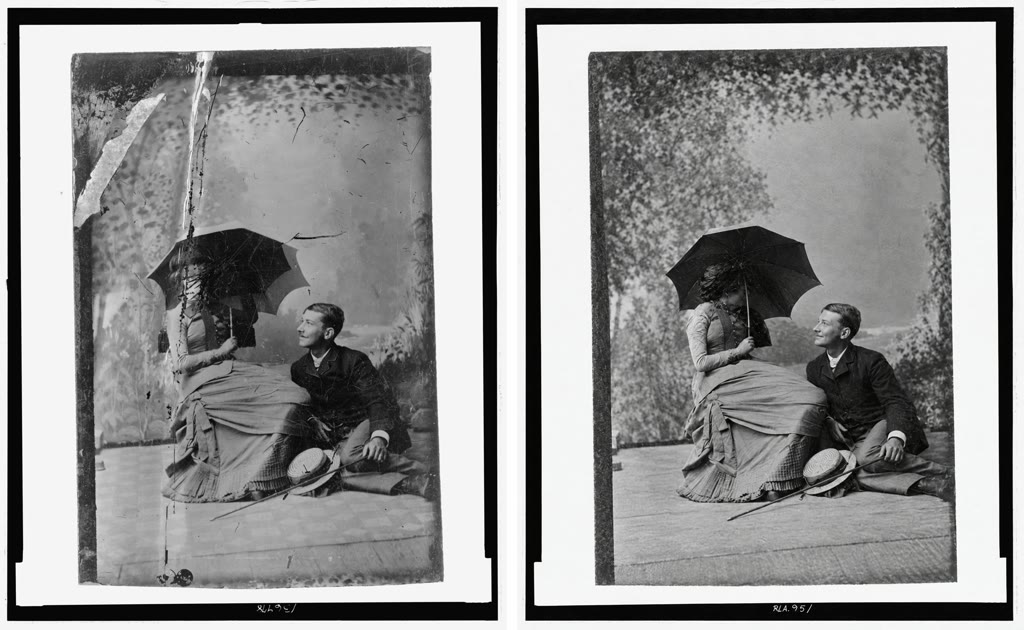
This one is torn and cracked rather than water-damaged, but it shows the same limit. The tear through the backdrop and the man's figure came out well. The woman's face, under the umbrella, was already lost in the original. The restore did not invent a new face; it left a dark, uneven patch. When emulsion has lifted off or a stain has eaten through a face, expect either a patch like this or a filled-in face that is a guess, not the person.
What it can't do:
- Recover emulsion that is gone. Water can make the image layer swell, stick and peel. Where it has come off, there is nothing to restore.
- Rebuild large missing areas faithfully. Anything filled in there is invented.
- Sharpen faces that were soft to begin with. They stay soft, or detail gets guessed.
Before you scan: handling a wet or stuck print
These are general precautions. For a valuable or one-of-a-kind photo, talk to a photograph conservator before doing anything.
- If the print is still wet, lay it face up on a clean, absorbent surface in a cool room with moving air. Don't use a hair dryer, heater or direct sun.
- Don't press the face. Wet emulsion is soft and marks easily. Don't blot or wipe the image side.
- Don't peel stuck photos apart, from each other or from glass. Peeling usually tears the image layer. This is where a conservator can help.
- Don't flatten a curled print with force. Leave it curled until you get advice, or scan it as it is.
- Handle by the edges, with clean, dry hands.
- Scan it soon once it's dry, so you have a copy if it gets worse.
How to scan it
- Use a flatbed scanner if you can, at 600 dpi or more for small prints. Scan in color, even for black-and-white prints.
- If the print is stuck to glass, scan it through the glass rather than removing it.
- If you use a phone, shoot in soft daylight with no flash, straight on, filling the frame.
- Upload at oldpics.ai. Turn on Compare if you want several versions in one go (2 on free, 1 restore; 6 with a pack, 4 restores) so you can keep whichever handled the damage better. Quality is set for you: Standard on free restores, High with a pack.
FAQ
Will it remove brown water rings?
Usually, yes, when the image under the ring is still there. Rings that have bleached or lifted the image leave gaps that have to be filled in.
My photos are stuck together. Can I scan them anyway?
Don't pull them apart yourself. Scan the visible sides as they are and ask a conservator about separating them.
Can it bring back a face that the water destroyed?
No. It can fill the area, but what it puts there is a guess and may not look like the person.
What does it cost?
5 restores are free with no card and no subscription. Packs are $9 for 20 or $29 for 100, one-time, and use High quality instead of Standard.
Restore a stained or water-damaged photo at oldpics.ai. Start with 5 free restores.
Related guides
Last updated: 25 September 2026